

 Team Out of Town
Gone are the days when you had to keep a physical Taxpayer Identification Number (TIN) card tucked away in your wallet or worry about replacing it if it gets lost. Thanks to the Philippine government’s digital transformation efforts, taxpayers can now access their BIR Digital TIN ID through the eGovPH app, making it easier than ever to verify their identity during various transactions.
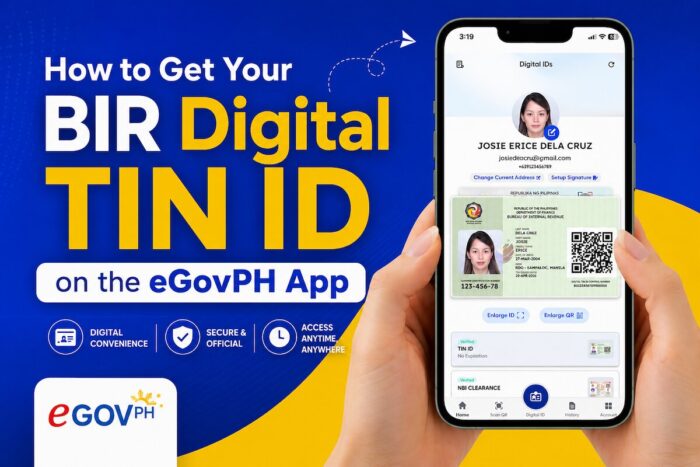
How to Get Your BIR Digital TIN ID on the eGovPH App
Whether you’re starting your first job, running a business, freelancing, or simply updating your government records, having a Digital TIN ID can save you time and provide quick access to one of your most important tax documents. In this guide, we’ll explain what the Digital TIN ID is, who can get one, its benefits, the requirements you’ll need, and how to generate it using the eGovPH app.
What Is the BIR Digital TIN ID?
The BIR Digital TIN ID is the electronic version of the traditional Taxpayer Identification Number card issued by the Bureau of Internal Revenue (BIR). Instead of carrying a physical ID, you can conveniently access your TIN information through the official eGovPH mobile app on your smartphone.
The digital ID displays essential taxpayer information, including your registered name, TIN, photo, and a QR code that helps verify its authenticity. Because it is linked to your official BIR records, it provides a secure and convenient way to present your taxpayer identification whenever it’s required.
Who Can Get a Digital TIN ID?
If you already have a valid Taxpayer Identification Number registered with the BIR, you’re generally eligible to obtain a Digital TIN ID through the eGovPH app.
This includes:
- Employees in both the public and private sectors
- Self-employed professionals
- Freelancers and online sellers
- Business owners
- Mixed-income earners
- Other registered taxpayers
If you don’t have a TIN yet, you’ll first need to register with the BIR before you can generate your Digital TIN ID.
Benefits of Having a BIR Digital TIN ID
One of the biggest advantages of the Digital TIN ID is convenience. Since it’s stored on your mobile device through the eGovPH app, you can access it anytime without carrying an extra card.
Other benefits include:
Faster Transactions
Whether you’re opening a bank account, applying for a loan, starting a new job, or completing government paperwork, your Digital TIN ID is readily available whenever proof of your TIN is required.
More Secure Verification
The Digital TIN ID includes a QR code that allows institutions to verify its authenticity, helping reduce the risk of fraudulent or fake IDs.
No More Lost IDs
Physical cards can be misplaced, damaged, or forgotten at home. With the digital version, your TIN ID is always just a few taps away on your smartphone.
Supports Digital Government Services
The Digital TIN ID is part of the Philippine government’s ongoing effort to modernize public services and make transactions more accessible through digital platforms.
Requirements Before You Apply
Getting your Digital TIN ID is straightforward, but you’ll need to prepare a few things first.
You’ll need:
- A valid and active Taxpayer Identification Number (TIN)
- A registered and verified eGovPH account
- A smartphone with the latest version of the eGovPH app installed
- A stable internet connection
- Updated and accurate personal information in your BIR records
If your personal details in the app don’t match your BIR records, you may need to update your information with the Bureau of Internal Revenue before your Digital TIN ID can be generated successfully.
How to Get Your BIR Digital TIN ID Using the eGovPH App
Once you’ve met the requirements, you can generate your Digital TIN ID by following these simple steps.
Step 1: Download the eGovPH App
If you haven’t installed it yet, download the official eGovPH app from the Google Play Store or the Apple App Store.
Step 2: Sign In or Create an Account
Log in using your existing eGovPH account. New users will need to register and complete the account setup process.
Step 3: Verify Your Identity
Follow the verification process within the app. Depending on your account status, this may include facial recognition and validating your personal information.
Step 4: Open the BIR Services Section
From the app’s homepage, navigate to the BIR services available within the eGovPH platform.
Step 5: Generate Your Digital TIN ID
Once your information has been successfully matched with your BIR records, your Digital TIN ID will appear in the app. It will display your taxpayer information along with a QR code that can be used for verification.
Step 6: Use It When Needed
Whenever you’re asked to present proof of your TIN, simply open the eGovPH app and show your Digital TIN ID.
Where Can You Use Your Digital TIN ID?
Your Digital TIN ID may be accepted in various situations where your Taxpayer Identification Number is required, including:
- Employment applications
- Bank account opening
- Loan and credit card applications
- Government transactions
- Business registration
- Tax-related transactions
- Identity verification with participating institutions
Since individual organizations may have their own identification requirements, it’s still a good idea to confirm whether they accept the Digital TIN ID before your appointment.
Frequently Asked Questions
Is the BIR Digital TIN ID free?
Yes. Eligible taxpayers can access their Digital TIN ID through the eGovPH app without paying any additional fee.
Can I get a Digital TIN ID if I don’t have a TIN yet?
No. You must first register with the Bureau of Internal Revenue and obtain a valid Taxpayer Identification Number before you can generate a Digital TIN ID.
Is the Digital TIN ID an official government-issued ID?
Yes. The Digital TIN ID is issued through the Bureau of Internal Revenue and made available via the official eGovPH app. However, some institutions may have their own policies regarding which IDs they accept, so it’s best to verify their requirements beforehand.
Do I still need to keep my physical TIN card?
If you already have a physical TIN card, it’s still worth keeping. The Digital TIN ID provides a convenient electronic alternative, but some organizations may continue to request the physical card depending on their internal policies.
What if my information doesn’t match?
If the app cannot verify your details, you’ll likely need to update your records with the Bureau of Internal Revenue before trying again.
Final Thoughts
The launch of the BIR Digital TIN ID through the eGovPH app is another welcome step toward making government services more accessible and convenient for Filipinos. Instead of carrying a physical card everywhere, taxpayers can now keep their TIN securely stored on their smartphones and access it whenever it’s needed.
Whether you’re applying for a new job, opening a bank account, registering a business, or simply organizing your government documents, having a Digital TIN ID makes the process more convenient. If you already have a registered TIN, setting it up takes only a few minutes and gives you quick access to an official digital credential that supports the country’s growing digital government ecosystem.
Follow and subscribe to OutofTownBlog.com on Facebook , Twitter, Instagram, Pinterest, and YouTube for more Travel-related updates.
Read: A Step-by-Step Guide in Getting a TIN ID in the Philippines