
 Melo Villareal
GrabCar Group Ride Now Splits Fares Automatically, Offering Up to 50% Savings Per Passenger
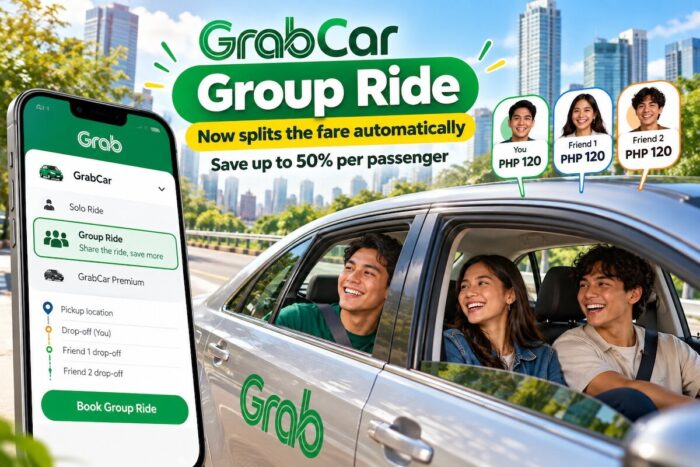
Grab Philippines has upgraded its GrabCar Group Ride feature to automatically split fares among passengers, helping commuters save up to 50% compared with booking a solo ride.
GrabCar Group Ride Now Splits Fares Automatically, Offering Up to 50% Savings Per Passenger
The updated feature allows up to three passengers to share one GrabCar booking, with each rider having a separate drop-off point. Designed for friends, families, and colleagues traveling in the same direction, the service makes splitting transportation costs easier and more convenient.
With the fare breakdown shown upfront, passengers know what they’ll pay before confirming their booking. This eliminates the need to calculate individual shares after the trip and makes group travel more straightforward.
Passengers can also save their regular ride companions, along with frequently used pickup and drop-off locations, for faster repeat bookings. The feature is especially useful for officemates heading home after work, friends going to events, and groups returning from a night out.
GrabCar 3-in-1 Campaign Brings Back 2000s Nostalgia
To introduce the upgraded feature, Grab Philippines launched its “GrabCar 3-in-1” campaign, inspired by the catchy shampoo sachet jingles popular in the 2000s.
The online video uses nostalgia to demonstrate how sharing a ride can help passengers get more value from their money. The central concept is simple: three passengers, one booking, and a fare automatically divided among them.
Like affordable 3-in-1 shampoo sachets that became familiar household staples, the campaign positions group rides as a practical option for commuters who want to spend less while traveling together.
“Filipino commuters are resourceful. They’re always finding smarter ways to make every trip with friends or colleagues more efficient and more affordable,” said Bea Bravo, Country Marketing Head of Grab Philippines.
Bravo added that the company aims to make transportation more accessible by building on the Filipino tradition of hati-hati, or sharing expenses. Beyond reducing individual costs, the approach reflects how friends and colleagues look out for one another during everyday journeys.
How to Book GrabCar Group Ride
Booking a GrabCar Group Ride requires only a few steps through the Grab app.
- Open the Grab app, select GrabCar, and choose Group Ride.
- Enter your pickup location and destination.
- Share the invitation link with up to two friends.
- Allow each passenger to add their preferred drop-off point.
- Confirm the booking and check the automatically divided fare.
Each passenger can see their share upfront, making it easier to coordinate transportation expenses without manually calculating how much everyone owes.
Where Is GrabCar Group Ride Available?
GrabCar Group Ride is available in all GrabCar cities nationwide, according to Grab Philippines.
For commuters who regularly travel with friends or colleagues, the feature offers another way to manage transportation expenses while keeping group trips convenient. By combining multiple passengers into one booking, Grab aims to make shared rides a more practical option for everyday travel.
Before booking, passengers should review the fare displayed in the app and confirm their individual drop-off points to ensure the trip suits everyone’s plans.
Follow and subscribe to OutofTownBlog.com on Facebook , Twitter, Instagram, Pinterest, and YouTube for more Travel-related updates.
Read:
- Top 10 Best Hotels and Resorts in Chiang Mai, Thailand
- These captivating vintage photos of Manila showcase its timeless charm, despite its dark past.
- Best Night Markets in Bangkok: Ultimate Guide to Street Food, Shopping & Nightlife
- Bangkok BTS Guide: How to Use the Skytrain, Routes, Fares, and Travel Tips
- Bangkok 4 Day Itinerary: The Ultimate Guide to Exploring Thailand’s Capital
- Best Places to Visit in Bangkok: 15 Must-See Attractions and Travel Guide
- Thailand Airport Baggage Rules 2026: Checked Luggage Inspections, Airline Allowances and Restricted Items