

 Melo Villareal
Apple Pay foodpanda: Everything Philippine Users Need to Know About the New, Faster Way to Pay
Some apps quietly become part of your daily routine, and for many Filipinos—including myself—foodpanda is one of them.
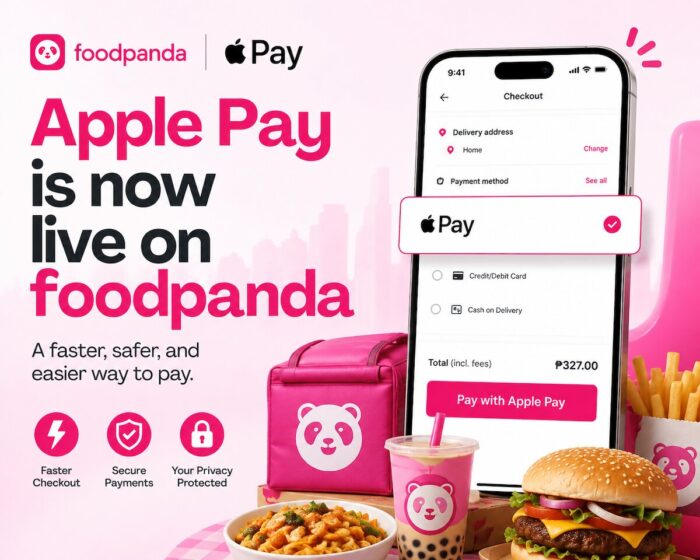
Apple Pay is now live on foodpanda
Whether it’s ordering coffee before starting work, satisfying a late-night craving for Korean fried chicken, having milk tea delivered on a hot afternoon, or buying groceries without leaving home, foodpanda has become one of the country’s most convenient lifestyle apps.
As someone who enjoys discovering new restaurants and hidden food gems, I’ve lost count of how many cafés, burger joints, ramen shops, and local eateries I’ve discovered through foodpanda. It’s become more than a delivery platform—it’s one of the easiest ways to explore the local food scene.
Now, ordering has become even more convenient with the arrival of Apple Pay on foodpanda.
While it may sound like a simple payment update, it significantly improves the checkout experience for Apple users. Instead of manually entering payment information, you can now complete your purchase with just Face ID, Touch ID, or your device passcode.
If you’re already part of the Apple ecosystem, this integration makes ordering food, groceries, and everyday essentials faster, easier, and more secure.
What Is Apple Pay?
Apple Pay is Apple’s digital wallet and contactless payment service that lets users make secure purchases using compatible Apple devices.
Instead of repeatedly typing your credit or debit card details, Apple Pay securely stores your eligible cards inside the Apple Wallet app.
Whenever you make a purchase, Apple Pay authenticates the transaction using:
- Face ID
- Touch ID
- Device passcode
The entire payment process takes only a few seconds.
One of its biggest advantages is privacy. Apple Pay doesn’t share your actual card number with merchants. Instead, it uses encrypted payment credentials that help keep your financial information protected during every transaction.
Apple Pay Is Now Available on foodpanda
For frequent foodpanda users, this is one of the most practical updates in recent months.
After selecting your meals or groceries, you can now choose Apple Pay during checkout instead of manually entering your payment information.
The result?
A smoother, faster, and more seamless ordering experience.
It’s one of those features you don’t realize you need until you start using it.
Why Apple Pay Makes foodpanda Even Better
Faster Checkout When You’re Hungry
Let’s be honest.
Nobody enjoys filling out payment forms when they’re already hungry.
There are moments when you’ve finally decided what to eat after scrolling through dozens of restaurants. The last thing you want is to slow down because you need to look for your wallet or type in your card details.
Apple Pay removes that friction.
With Face ID or Touch ID, checkout takes only seconds.
It’s a small improvement, but one you’ll appreciate every single time you place an order.
A More Secure Way to Pay
Security is becoming increasingly important for online shoppers.
Apple Pay adds multiple layers of protection by keeping your actual card number hidden from merchants.
Every payment requires authentication through your Apple device, helping reduce unauthorized transactions.
This means you enjoy both convenience and peace of mind whenever you order.
Perfect for Busy Professionals
Working from home has changed how many Filipinos eat.
Instead of going out for lunch, many simply order through foodpanda.
Apple Pay makes this even easier.
Imagine finishing a virtual meeting, opening foodpanda, selecting your lunch, confirming payment with Face ID, and getting back to work in less than a minute.
That’s exactly the kind of convenience people appreciate during busy weekdays.
Ideal for Students
College students are among foodpanda’s biggest users.
Whether it’s coffee before class, milk tea during study sessions, or dinner after exams, ordering food has become part of campus life.
Apple Pay helps simplify the process even further by making checkout almost effortless.
Great for Families
Parents often rely on foodpanda when schedules become hectic.
Ordering dinner for the family, buying groceries, or sending meals to loved ones becomes much easier when payment only takes a few seconds.
It’s one less thing to think about during a busy day.
More Than Food Delivery
Many people still associate foodpanda with restaurant deliveries.
Today, it’s much more than that.
You can also order:
- Fresh groceries
- Fruits and vegetables
- Frozen food
- Household supplies
- Pharmacy essentials
- Pet supplies
- Beauty and personal care products
Apple Pay works seamlessly across these purchases, making everyday shopping even more convenient.
Why Travelers Will Appreciate Apple Pay on foodpanda
As someone who travels frequently around the Philippines and abroad, I know how useful food delivery apps can be.
After arriving at a hotel late in the evening, the last thing I want is to search unfamiliar streets for dinner.
Instead, I simply browse foodpanda, choose a nearby restaurant, and wait comfortably inside my room.
Apple Pay makes this experience even better.
There’s no need to take out your wallet or remember card details after a long day of traveling.
Everything is already stored securely inside Apple Wallet.
For digital nomads, business travelers, and vacationers, it’s another small convenience that makes travel a little easier.
Discovering New Restaurants Has Never Been Easier
One of my favorite things about foodpanda is discovering restaurants I probably wouldn’t have visited otherwise.
Over the years, I’ve found:
- Hidden specialty coffee shops
- Authentic Japanese ramen restaurants
- Korean fried chicken favorites
- Local Filipino comfort food
- Family-owned cafés
- Artisan bakeries
- Dessert shops
Sometimes the best dining experiences begin with simply browsing foodpanda.
Now, thanks to Apple Pay, there’s even less friction between discovering something new and placing your order.
How to Use Apple Pay on foodpanda
Getting started is simple.
Step 1
Add your eligible credit or debit card to Apple Wallet.
Step 2
Open the latest version of the foodpanda app.
Step 3
Browse restaurants or grocery stores.
Step 4
Add your favorite items to your cart.
Step 5
Proceed to checkout.
Step 6
Choose Apple Pay.
Step 7
Authenticate using Face ID, Touch ID, or your device passcode.
Your order is complete in seconds.
Why Digital Wallets Continue to Grow in the Philippines
The Philippines has seen rapid growth in digital payments over the past several years.
Consumers increasingly expect faster, contactless, and more secure payment options when shopping online.
Whether paying for ride-hailing services, online shopping, streaming subscriptions, or food delivery, digital wallets have become an essential part of everyday life.
Adding Apple Pay to foodpanda reflects this growing preference for quick and secure digital transactions.
For Apple users, it also creates a more consistent experience across the apps and services they already use.
Tips for Making the Most of foodpanda
To maximize your foodpanda experience, consider these practical tips:
- Watch for exclusive Apple Pay promotions or partner offers.
- Join foodpanda’s rewards and loyalty programs.
- Compare restaurant delivery fees before checking out.
- Schedule deliveries during off-peak hours for faster service.
- Browse new restaurant recommendations regularly.
- Use grocery delivery for last-minute household needs.
- Save your favorite restaurants for quicker ordering.
These small habits can help you save both time and money while enjoying a smoother ordering experience.
Final Thoughts
As someone who genuinely enjoys trying different cuisines and discovering new restaurants, I appreciate any feature that makes ordering food easier.
Apple Pay may seem like a simple addition to foodpanda, but it improves the experience in meaningful ways.
The faster checkout, added security, and seamless integration with Apple Wallet remove unnecessary steps between you and your next meal.
Whether you’re ordering your favorite Filipino comfort food, Japanese sushi, pizza, burgers, coffee, bubble tea, or even your weekly groceries, Apple Pay helps make the entire process smoother.
For Apple users in the Philippines, it’s another reason why foodpanda continues to be one of the country’s most convenient food delivery and quick-commerce platforms.
The next time hunger strikes, you’ll spend less time checking out—and more time looking forward to your meal.
Frequently Asked Questions (FAQs)
Is Apple Pay available on foodpanda in the Philippines?
Yes. Apple Pay is now available as a payment option on foodpanda for eligible users in the Philippines with supported Apple devices and compatible payment cards.
Which Apple devices can use Apple Pay on foodpanda?
Apple Pay works on supported iPhone, Apple Watch, iPad, and Mac devices that have Apple Wallet set up with an eligible payment card.
Is Apple Pay safe for foodpanda transactions?
Yes. Apple Pay uses advanced encryption, tokenization, and biometric authentication such as Face ID or Touch ID, helping keep your payment information secure.
Can I use Apple Pay for grocery deliveries?
Yes. Apple Pay can be used for eligible grocery, retail, pharmacy, and restaurant orders placed through foodpanda.
Do I need to enter my card details every time?
No. Once your card is added to Apple Wallet, you can complete purchases using Face ID, Touch ID, or your device passcode without manually entering your payment information.
Does Apple Pay charge extra fees on foodpanda?
No. Apple Pay itself does not charge additional fees for making purchases through foodpanda, although your card issuer’s standard terms and conditions still apply.
Follow and subscribe to OutofTownBlog.com on Facebook , Twitter, Instagram, Pinterest, and YouTube for more Travel-related updates.
Read: foodpanda Delivers Vacation Vibes Right to Your Doorstep